Get 10% back in Relic Coins on every order
EVERSPACE - Upgrade to Deluxe Edition DLC cover

SteamGlobal· DLC

EVERSPACE - Upgrade to Deluxe Edition DLC

€0.56

+€0.06 cashback eligibility in Relic Coins

Check before you play

Platform
Steam
Region
Global
Product type
DLC

Check the required base game and edition before purchasing this add-on.

Developer
ROCKFISH Games
Publisher
ROCKFISH Games
Supplier release date
2017-08-17
Genres
Action, Indie

About this product

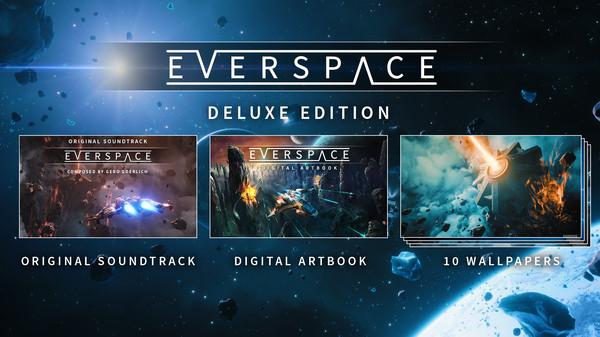
The Sound of EVERSPACE™ – Enjoy a huge variety of eery ambient space sounds made up of electronic synthesizers and real-life audio samples, classical themes, punchy rock riffs, electronic piano tunes, and songs accompanied by floating backing vocals. Driving beats, odd time signatures, and the use of some bizarre “instruments” like a tiny plastic guitar and a drum kit made of chairs and sofas always keep things interesting. This original soundtrack contains more than 60 tracks (FLAC and mp3 format), adding up to a duration of over three hours in total. The Art of EVERSPACE™ – Discover a romanticized interpretation of space with vibrant colors, fantastic visual effects, spectacular planets, and beautiful space backdrops that leave you in awe. It is combined with a cool, yet functional looking technical design for space ships and other man-made structures. This digital artbook contains 48 pages of full-colored art work. It is only available in English. EVERSPACE™ Wallpapers – Space up your desktop with 10 carefully retouched wallpapers in 4K (3840 x 2160 px) and in Full HD (1920 x 1080 px).

EVERSPACE - Upgrade to Deluxe Edition DLC screenshot

How to redeem

  1. 1Check the required base game, platform and edition before purchasing.
  2. 2Find the code or supplier activation instructions in your confirmed order.
  3. 3Redeem on Steam using the supplied instructions, then install the add-on with the compatible base game.

Supplier instructions

Go to: http://store.steampowered.com/ and download STEAM client Click "Install Steam" (from the upper right corner) Install and start application, login with your Account name and Password (create one if you don't have). Please follow these instructions to activate a new retail purchase on Steam: Launch Steam and log into your Steam account. Click the Games Menu. Choose Activate a Product on Steam... Follow the onscreen instructions to complete the process. After successful code verification go to the "MY GAMES" tab and start downloading.

You might also like