Get 10% back in Relic Coins on every order
Borderlands 3 - Season Pass DLC cover

Steam Europe - All Countries· DLC

Borderlands 3 - Season Pass DLC

€12.18

+€1.22 cashback eligibility in Relic Coins

Check before you play

Platform
Steam
Region
Europe - All Countries
Product type
DLC

Check the required base game and edition before purchasing this add-on.

Supplier release date
2020-03-13
Genres
Action, RPG

About this product

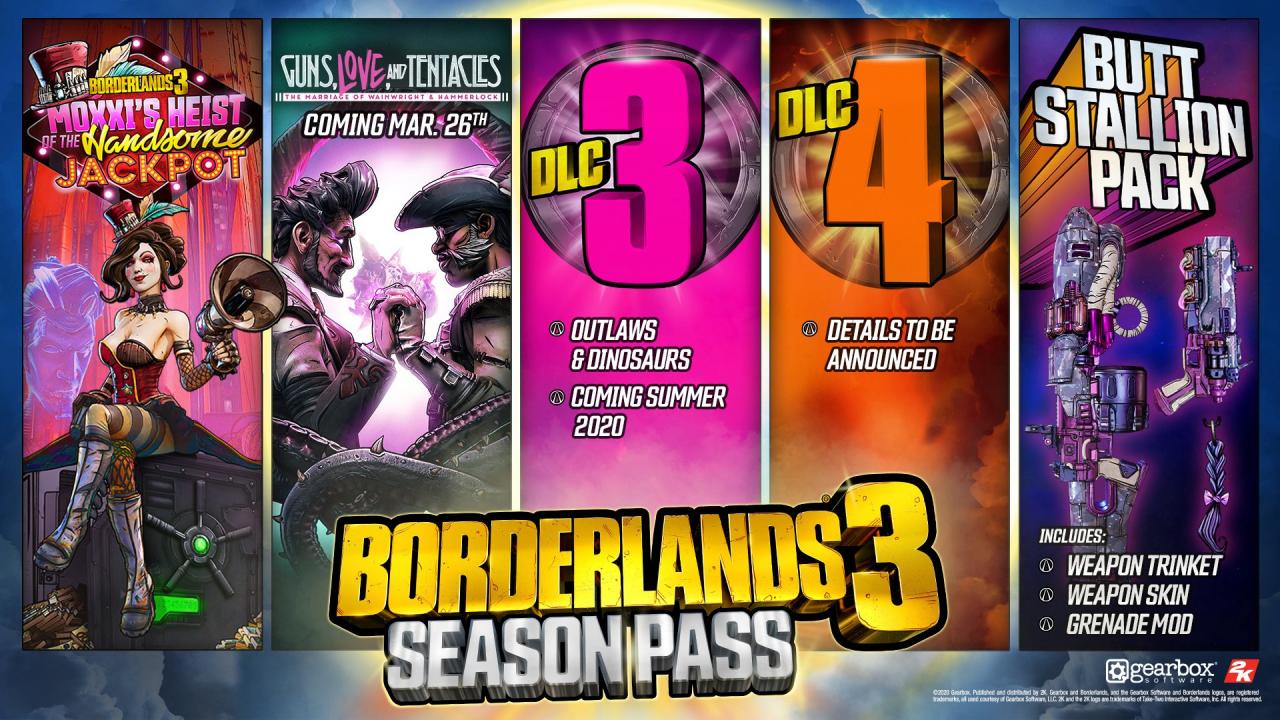
Continue your Borderlands 3 adventure with the Season Pass, featuring exclusive cosmetic items and four story campaign add-ons with new missions and challenges! The Season Pass includes: 4 campaign DLC packs featuring new stories, missions and challenges Butt Stallion weapon skin Butt Stallion weapon trinket Butt Stallion grenade mod DLC 1: Moxxi’s Heist of the Handsome Jackpot is available now. Are you ready for the biggest score of your loot-hunting career? Moxxi has just the job for you: a good old-fashioned heist. She's looking to take control of a space station casino called The Handsome Jackpot. Should you succeed, a safe loaded with loot awaits! There's just one small problem: the casino houses an army of Hyperion security forces and crazed casino-goers. Will luck be on your side? DLC 2: Guns, Love, and Tentacles: The Marriage of Wainwright & Hammerlock will be available on March 26. All Season Pass DLC will be available by September 2020.

Borderlands 3 - Season Pass DLC screenshotBorderlands 3 - Season Pass DLC screenshotBorderlands 3 - Season Pass DLC screenshotBorderlands 3 - Season Pass DLC screenshotBorderlands 3 - Season Pass DLC screenshotBorderlands 3 - Season Pass DLC screenshot

How to redeem

  1. 1Check the required base game, platform and edition before purchasing.
  2. 2Find the code or supplier activation instructions in your confirmed order.
  3. 3Redeem on Steam using the supplied instructions, then install the add-on with the compatible base game.

Supplier instructions

Go to: http://store.steampowered.com/ and download STEAM client Click "Install Steam" (from the upper right corner) Install and start application, login with your Account name and Password (create one if you don't have). Please follow these instructions to activate a new retail purchase on Steam: Launch Steam and log into your Steam account. Click the Games Menu. Choose Activate a Product on Steam... Follow the onscreen instructions to complete the process. After successful code verification go to the "MY GAMES" tab and start downloading.

You might also like